

In my previous posts I explained a bit about Oracle JET VComponents. By now you should know the basics of how they work, and how they can be used in the application where they were created. But what if you want to use a VComponent in a separate application, and eventually even in an Oracle Visual Builder application? How can you distribute your VComponent for re-use? In this post we will have a look into reusing in a separate application. It is actually rather simple. In a later post I will explain how to do the same in an Oracle Visual Builder application.
Introduction
For this post we will assume that you have access to the drawingpad component that was created in the previous blogpost. From there on it is pretty straightforward to create an actual re-usable component. This is the component that we are going to package and re-use.
Step 1: Preparing the component
To package the web component for distribution, you first need to build it. The following command will do the trick:
npx ojet build component drawingpad-componentThis will create a separate folder under the web/components folder, dedicated to the drawingpad-component, as you can see in the image below:
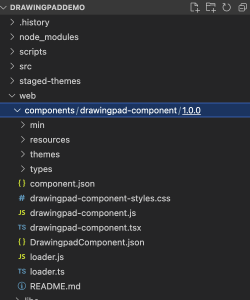
Next step is to run the package command:
npx ojet package component drawingpad-componentThis will create a dist folder (if not yet available) which contains a ZIP file. the name of the file is drawingpad-component_1.0.0.zip which is obviously derived from the name of the component and the version number.

Step 2: Re-using the component
As mentioned in the introduction, there are several ways to re-use the component. In this post I will only discuss the simplest way: Creating a copy of the component in the stand-alone application.
Lets first create a simple stand-alone application that will consume the component:
npx @oracle/ojet-cli create Consume-DrawingPadDemo --template=basic --vdomIn your new application you will find a folder named “components”. Within this folder, you should now create a new folder named “drawingpad-component” as can be seen from the image below.
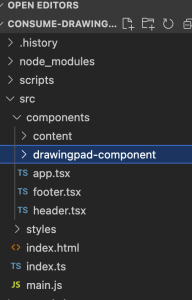
You can now unzip the content of the drawingpad-component_1.0.0.zip file into this new folder.
With that, you have access to the component in this new application, and it can be easily added to any page, for instance like below:
import { h } from "preact";
import { customElement, GlobalProps } from 'ojs/ojvcomponent';
import { DrawingpadComponent } from 'drawingpad-component/loader'

export function Content() {
  return (
    <div class="oj-web-applayout-max-width oj-web-applayout-content">
      <DrawingpadComponent/>
    </div>
  );
};
Other solutions:
In a next post I will explain how to re-use the component via the Oracle Component Exchange and via a Content Delivery Network (CDN).