

Previously I wrote a post explaining how to setup and use Oracle Select AI. That post showed the basics of this nice feature, but I found that there is more to explore.
Last month I visited KScope24 and gained some new knowledge in the session of Oracle’s Mark Hornick (Senior Director Product Management, Oracle Data Science and Machine Learning) who in his session on “GenAI and Oracle Autonomous Database” also touched on Oracle SelectAI.
Here is the quick pick for all of those who want to use SelectAI, and just like me missed this interesting detail. In this post I want to add some additional information regarding this feature.
The main pick is the conversational LLM interaction. You can simply ask a question, review the result, and based on that ask a follow up question to refine or the get more information. This can be achieved by adding the “conversation” : “true” to the PROFILE.
BEGIN
 DBMS_CLOUD_AI.SET_ATTRIBUTE(
   profile_name    => 'openai_gpt35',
   attribute_name  => conversation',
   attribute_value => ‘TRUE’
 );
END;
Note that I used the DBMS_CLOUD_AI.SET_ATTRIBUTE to change my existing profile. Very handy indeed. I do not have to drop and recreate the profile, just add the attribute to it.
Now we can start a conversation. Lets see which employees work in New York:
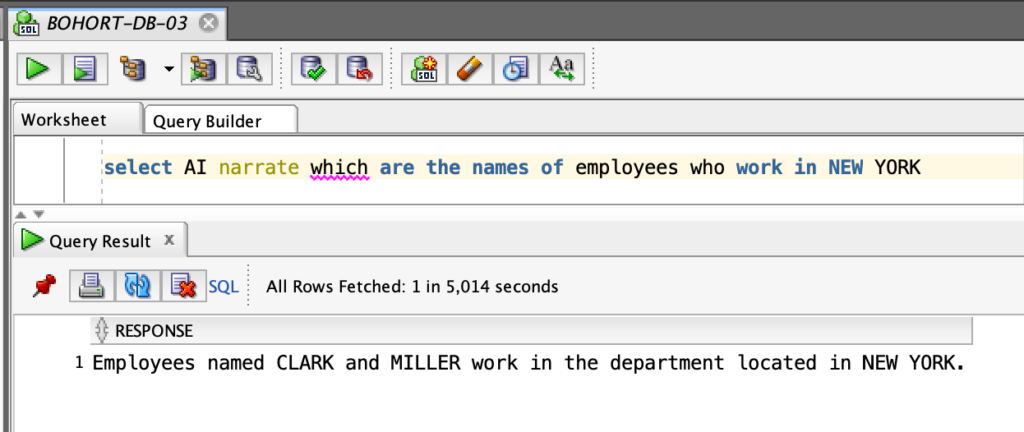
It should now be possible to continue with this result. Lets ask a follow up question, such as the name of this department.

Cool, that seems to work. Lets wrap this up by checking if we can get the salaries of the two employees.

There you go. Works like a charm.
Hope this helps you a bit when setting up SelectAI.