

Importing the CAR Is Easy — Activating It Is the Trap
If you’ve ever tried to setup automated OIC Project deployment and if, like me, you went looking for one in the docs, you probably wasted half an afternoon before realising what’s actually going on.
This post walks through what I learned automating CAR file promotion between OIC environments.
The Setup
A common CI/CD scenario for OIC: you’ve built a project in your dev instance, exported the deployment as a .car file (let’s say TEST_PROJECT-01.00.0001.car), and now you want a pipeline to push it to test or prod and turn it on. Two steps, conceptually:
- Import the CAR into the target environment.
- Activate the deployment so the integrations actually start handling traffic.
Step 1 is well-documented and works exactly as advertised. Step 2 is where it gets interesting.
Step 1 — Import the CAR
This one’s straightforward. Post the archive to the projects archive endpoint:
curl -X POST \
  'https://<OIC_HOST>/ic/api/integration/v1/projects/archive' \
  -H 'Authorization: Bearer <TOKEN>' \
  -H 'Accept: application/json' \
  -H 'Content-Type: multipart/form-data' \
  -F 'type=application/octet-stream' \
  -F 'file=@TEST_PROJECT-01.00.0001.car'
OIC unpacks the archive, creates the project (or merges into an existing one), and registers the deployment manifest. At this point everything is imported but inactive — the integrations exist with status CONFIGURED, not ACTIVATED.
Step 2 — The Plot Twist: There Is No “Activate Deployment” Endpoint
I went looking in the documentation for a REST endpoint to activate the deployment. Unfortunately it doesn’t exist. Here’s the complete list of REST operations Oracle exposes for project deployments, according to the documentationlink:
| Method | Path | Purpose |
|---|---|---|
POST | /ic/api/integration/v1/projects/{projectId}/deployments | Create deployment |
GET | /ic/api/integration/v1/projects/{projectId}/deployments | List deployments |
GET | /ic/api/integration/v1/projects/{projectId}/deployments/{id} | Get deployment |
POST | /ic/api/integration/v1/projects/{projectId}/deployments/{id} | Update deployment |
DELETE | /ic/api/integration/v1/projects/{projectId}/deployments/{id} | Delete deployment |
That’s it. Five endpoints, none of which activate anything.
This is weird, because in the OIC console there is an Activate button for every project deployment.
So what does the Activate button in the console actually do? Indeed, it calls a REST API. Let’s go ahead and try if we can use this REST API in our pipeline.
Step 3 — Replicating the Activate Button
The easy way to figure this out is to watch via chrome developertools which Endpoint is called when you click the Activate button on a project deployment in Oracle Integration Cloud (OIC) Gen 3.
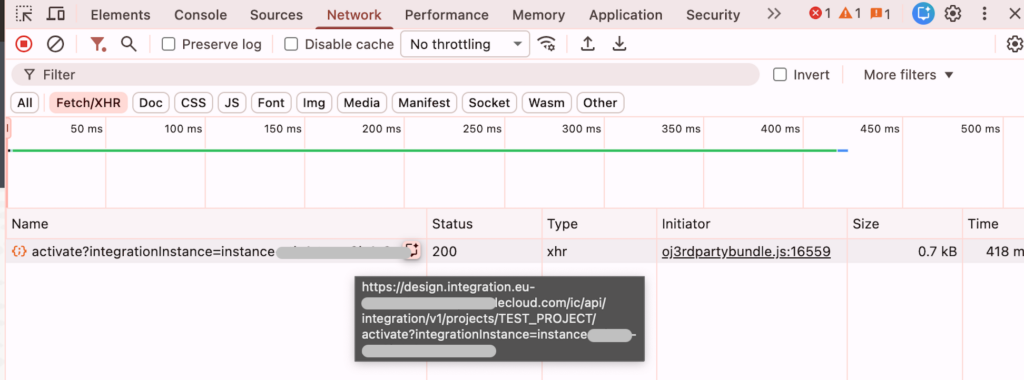
And there you have it.
| Method | Path | Purpose |
|---|---|---|
POST | /ic/api/integration/v1/projects/{projectId}/activate | Activate a deployment |
3a. Activate the deployment
Now you can simply invoke that REST API to activate a deployment.
- The required body is just
{"traceType": “PRODUCTION”, “label": "01.00.0000"}.
curl -X POST \
  'https://<OIC_HOST>/ic/api/integration/v1/projects/{projectId}/activate' \
  -H 'Authorization: Bearer <TOKEN>' \
  -H 'Accept: application/json' \
  -H 'X-HTTP-Method-Override:PATCH' \
  -d  $body \
To deactivate later, you can use the similar way to find out which endpoint to use.
| Method | Path | Purpose |
|---|---|---|
POST | /ic/api/integration/v1/projects/{projectId}/deactivate | Deactivate a deployment |
- The required body is just
{“label": "01.00.0000"}.
That’s the full “import and activate” sequence in a CI/CD context.
Takeaways
- Importing a CAR is one clean REST call to
/projects/archive. - Activating the resulting deployment is also a single call — however, it is not found in the Oracle Documentation
- The console’s Activate button is calling the API.
